FAQ
->
WiFi / Eduroam
->
Eduroam (easyroam)
Linux
Setup with the easyroam app
These instructions serve only as a supplement to the official DFN documentation and may contain minor additions to it.
You can find the latest instructions at https://doku.tid.dfn.de/en:eduroam:easyroam.
For the official installation of the app, the cross-distribution package manager Snap must already be installed and configured! This is already the case on Ubuntu. Instructions for other distributions can be found at https://snapcraft.io/docs/installing-snapd.
Alternatively, there is an unofficial community repack of the app as Flatpak. Flatpak is more widely used among non-Ubuntu distributions and is easier and faster to install. https://flathub.org/setup
We have tested Flatpak and, as of January 2025, can recommend it for non-Ubuntu distributions, but only Snap is officially supported by the DFN!
- Install the easyroam app from one of the following sources
- Snap: https://snapcraft.io/easyroam (official)
- Flatpak: https://flathub.org/de/apps/de.easyroam.easyroam (unofficial)
- Open easyroam via the app launcher
- Click on “Sign in”
- In the browser window that opens, select “Hochschule Bonn-Rhein-Sieg IDM” and log in with your MIA account details
The current version of the easyroam app does not work when using the xorg display server. After successfully logging in, the app will crash and will no longer open. This problem does not occur with wayland. Please use a modern desktop environment or the manual version directly.
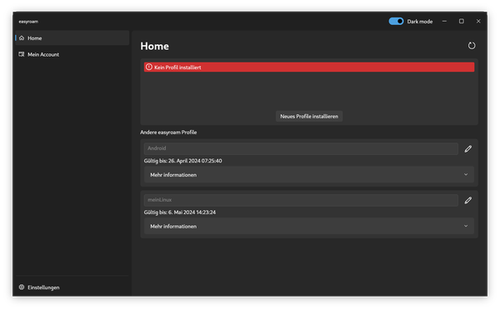
- Click on “Install new profile” in the app
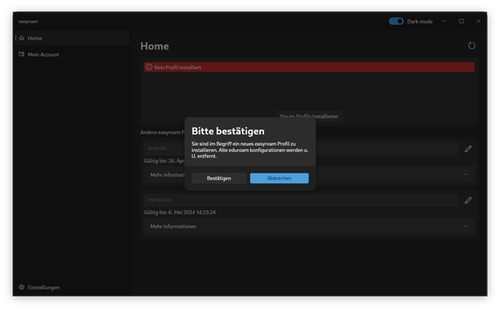
- Confirm the installation
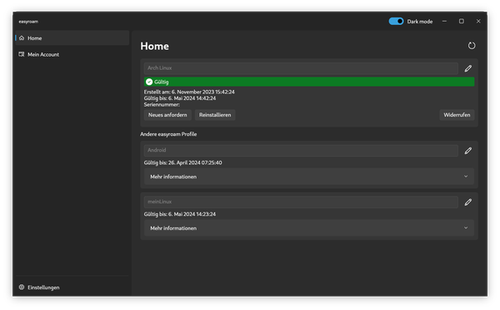
- The profile should then be installed, and you can select “eduroam” in the Wi-Fi connections and connect to it
Semi-manual setup
The TH Aschaffenburg does provide a script that extracts all data from the certificate and feeds it to the Network Manager:
https://helpdesk.th-ab.de/help/en-us/6-configure-eduroam-easyroam/9-easyroam-linux-ubuntu-english
This script automates the steps explained below as manual setup. If something does not work, please switch to the completely manual method.
Manual setup
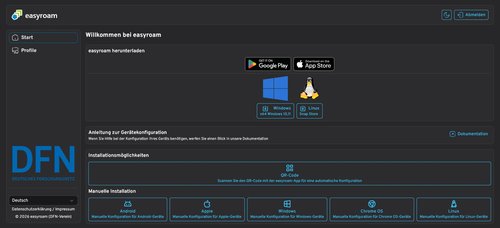
- Open easyroam.de in your web browser.
- Select “Hochschule Bonn-Rhein-Sieg IDM” from the list and log in with your MIA account details
- Under “Manual Installation”, select “Linux”
- Set a name for the profile and press OK to start downloading the .p12 file
- Rename the file to “easyroam.p12” and move it to a folder of your choice.
- Open a terminal in this directory and run the following commands to extract the certificates:
openssl pkcs12 -legacy -in easyroam.p12 -nokeys -passin pass: -out easyroam_client_cert.pem
openssl pkcs12 -legacy -in easyroam.p12 -cacerts -nokeys -passin pass: -out easyroam_root_ca.pem
openssl pkcs12 -legacy -in easyroam.p12 -nocerts -passin pass: -out easyroam_client_key.pem
- Enter a password of your choice in the “Enter pass phrase:” prompt. Make a note of this Key Password for later configuration
- Confirm this password in the “Verifying - Enter pass phrase:” prompt
openssl x509 -noout -subject -in easyroam_client_cert.pem | sed -e 's/.*=//' -e 's/\s*//'
- Copy the output of this command (“serial number”@easyroam-pca.h-brs.de). You will need this Common Name later for configuration
- The serial number can also be found under “Manage profiles” on the easyroam website
Desktop configuration
- Open the Wi-Fi settings and connect to the “eduroam” SSID
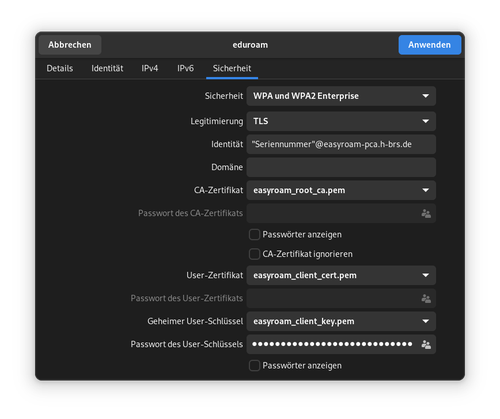
- Set the settings as follows (may vary depending on the desktop interface):
- Security: WPA2 Enterprise
- Authentication: TLS
- Identity: Common Name (“Serial Number”@easyroam-pca.h-brs.de)
- CA certificate: easyroam_root_ca.pem
- User certificate: easyroam_client_cert.pem
- Secret user key: easyroam_client_key.pem
- User key password: Key Password (the password you assigned when extracting the private key)
Configuration without GUI
For advanced users - Only use these methods if nothing else has worked, or if you know exactly what you are doing!
Here you will find a collection of configuration templates for non-standard network managers. However, we recommend using a desktop environment with NetworkManager and wpa_supplicant.
These examples assume that the extracted files have been moved to /etc/easyroam/. Adjust the configuration files to your setup.
wpa_supplicant without NetworkManager
/etc/wpa_supplicant/wpa_supplicant.conf

network={
   ssid="eduroam"
   scan_ssid=1
   key_mgmt=WPA-EAP
   proto=WPA2
   eap=TLS
   pairwise=CCMP
   group=CCMP
   identity="Common-Name"
   ca_cert="/etc/easyroam/easyroam_root_ca.pem"
   client_cert="/etc/easyroam/easyroam_client_cert.pem"
   private_key="/etc/easyroam/easyroam_client_key.pem"
   private_key_passwd="Key-Passwort"
}
connman
/var/lib/connman/eduroam.config

[service_eduroam]
Type = wifi
Name = eduroam
EAP = tls
Identity = Common-Name
ClientCertFile = /etc/easyroam/easyroam_client_cert.pem
PrivateKeyFile = /etc/easyroam/easyroam_client_key.pem
PrivateKeyPassphrase = Key-Passwort
iwd
/var/lib/iwd/eduroam.8021x

[Security]
EAP-Method=TLS
EAP-Identity=Common-Name
EAP-TLS-ClientCert=/etc/easyroam/easyroam_client_cert.pem
EAP-TLS-ClientKey=/etc/easyroam/easyroam_client_key.pem
EAP-TLS-ClientKeyPassphrase=Key-Passwort